

Sources
A source is a named place applications come from. Sources are set up under Settings > Sources, and one is picked on an application under Procedure.
Where an application came from is recorded as either a promotion or a source. A promotion is a listing you bought, so Applyfin knows what it cost. A source is everything else you want to count separately. Without a source, an application that did not come through a paid listing has no origin.
Relations
- Application — records the source it came from.
- Job opening — a source's traffic is shown per job opening.
- Promotion — the other way to record where an application came from.
- Dashboard — the Applications tab breaks results down by source.
Creating a source
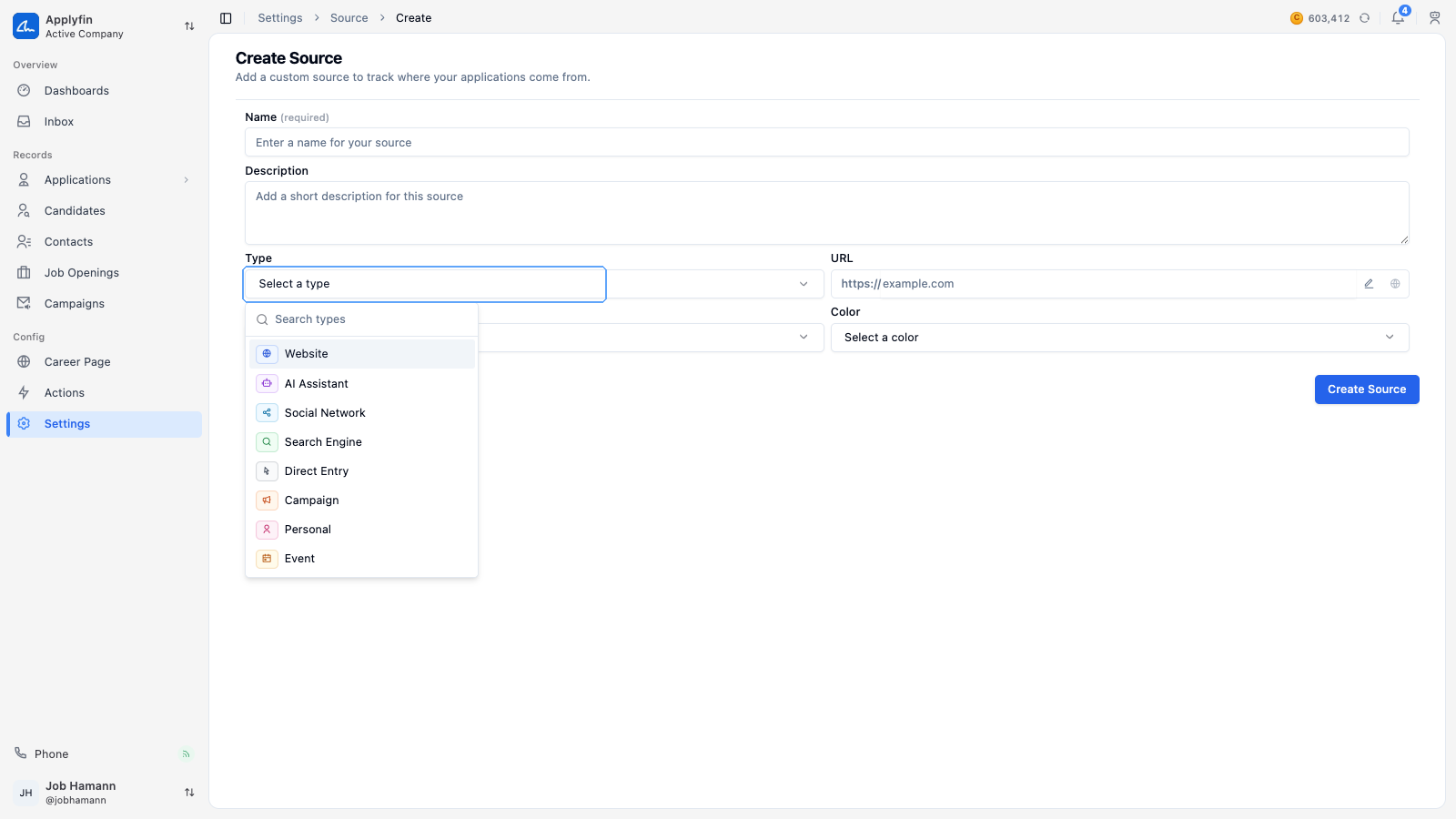
To count applications from somewhere you are not paying for, create a source for it.
- Open Settings > Sources and select Create New.
- Fill in the Name.
- Write a Description.
- Pick the Type.
- Fill in the URL.
- Pick an Icon and a Color.
- Select Create Source.
The source appears under Settings > Sources and can be picked on an application.
Source types
- Website — your own site or another site.
- AI Assistant — a chat assistant that sent the person to you.
- Social Network — an unpaid post or profile.
- Search Engine — organic search.
- Direct Entry — a visitor who typed in your address or used a bookmark.
- Campaign — a campaign you are tracking yourself.
- Personal — a referral, or an approach made by one of your users.
- Event — a fair, an open day or a meetup.
Reading a source's traffic
To see what a source brought you, open its traffic.
- Open Settings > Sources and select the source.
- Select Traffic.
- Search for a job opening.
The table lists the job openings the source brought applications to, with its Visits, Avg actions, Bounces, Converted visits and Goals.
Finding a source
The list shows the Name, the Type and the number of Applications. Created can be added.
To find one, open Settings > Sources and search by name. The source's own header shows how many applications it has produced.
Setting the source
An application's source is picked on its Details tab, under Procedure, next to the Job Opening, the Stage and the Assignee. It saves immediately.